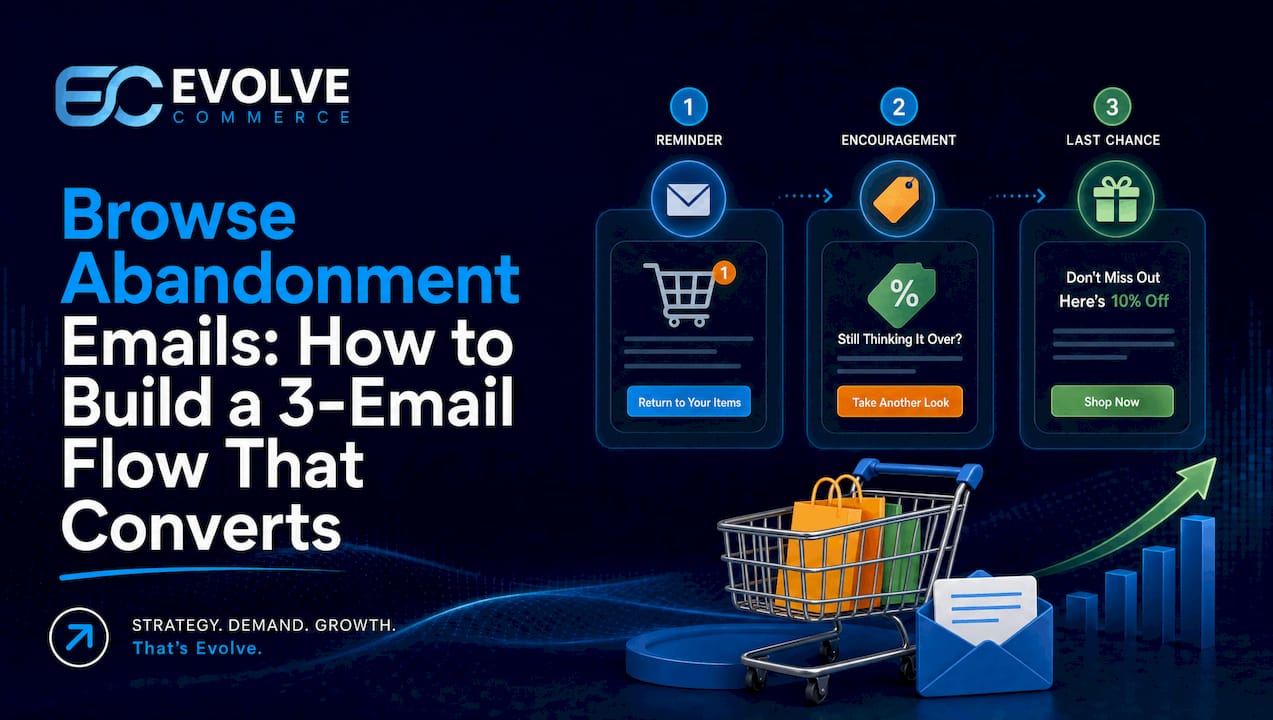
Use a light one to three email browse abandonment flow that shows the exact product a visitor viewed, adds a handful of relevant recommendations, and holds off on discounts until the final message. This works best for stores with many SKUs, considered purchases, or strong repeat-purchase potential. The first move is technical, not creative: enable a “viewed product” trigger in your ESP and enforce a consent check at send time before a single email goes out.
- Ensuring a minimum intent threshold, such as multiple views or longer dwell time, prevents underperforming browse flows from triggering on casual visits.
- Sending the first browse email within 1 to 4 hours and including a soft call to action helps maintain relevance without appearing intrusive.
- Discounts should only be offered in the final email of a sequence, typically 3 to 5 days after the initial view, to maximize value and avoid training customers to wait.
- Excluding recent buyers and cart abandoners from browse flows is essential to maintain relevance and comply with data protection rules.
- Properly setting up tracking, triggers, and suppression rules within the ESP significantly impacts browse abandonment flow performance and KPI results.
Table of Contents
- What are browse abandonment emails and how do they differ from cart abandonment?
- Why run browse abandonment automations: the revenue case
- Who should get browse abandonment emails and when should you filter them out?
- When should you send each email in a browse abandonment flow?
- What should a browse abandonment email actually contain?
- How do you set up a browse abandonment flow in your ESP?
- What KPIs and benchmarks should you track?
- Why do browse abandonment flows underperform, and how do you fix it?
- How Evolve Commerce builds browse flows into a full-funnel system
- The ‘gracious host’ standard for browse-abandonment emails
- How Evolve Commerce can help you recover lost browse traffic
- Sources
- FAQ
What are browse abandonment emails and how do they differ from cart abandonment?
Browse abandonment emails fire when a known visitor looks at a product or category page and leaves without adding anything to their basket. That single detail, no add-to-cart event, is what separates them from cart abandonment emails, which trigger only once a shopper has shown clear purchase intent by placing an item in their basket.
The distinction matters because it changes everything downstream: tone, cadence, and how hard you push. A shopper who viewed a jacket twice and left is at an earlier stage than one who added it to their basket and abandoned checkout. Treating both the same way, with the same urgency or the same discount code, misreads the moment.
Three practical differences shape how you build the flow:
- Audience size: browse abandonment reaches a far larger pool of visitors than cart abandonment, because most site traffic never gets as far as adding to cart.
- Conversion expectation: individual browse emails convert at a lower rate than cart recovery emails, since intent is softer and less committed.
- Recommended structure: best practice favours a 1 to 3 email sequence for browse flows, lighter in tone and slower in pace than the typical 2 to 4 email cart sequence.
Browse automation earns its place in an email programme once you have enough traffic volume to make the segment meaningful and enough product breadth that a “you might also like” message actually says something useful. A five-SKU store selling one hero product has little to gain here. A 500-SKU homeware retailer has a lot.
Why run browse abandonment automations: the revenue case
Browse abandonment flows recover demand that would otherwise disappear entirely, and they do it at a scale cart flows cannot match. Because the trigger fires on page views rather than basket adds, the addressable audience is typically many times larger than any cart abandonment segment. The tradeoff is revenue per recipient: each browse email earns less on average than each cart recovery email, but multiplied across a much bigger list, the total contribution to lifecycle revenue is often comparable, sometimes higher.
Industry data backs the sheer efficiency of the channel even before you factor in volume:
Browse abandonment emails can reach open rates in the 34 to 45% range, with conversion rates typically around 1 to 3%, figures that sit well above standard promotional campaign benchmarks.
Certain product categories benefit more than others. Considered purchases, furniture, electronics, premium fashion, anything a shopper researches across multiple sessions, respond well because the browse window itself signals genuine deliberation rather than idle scrolling. High-SKU stores also do well, since there is always a relevant alternative or complement to surface.
Browse abandonment sits in a specific place in the lifecycle. Welcome flows introduce new subscribers and set expectations. Cart flows recover near-purchase moments. Post-purchase flows drive repeat orders and reviews. Browse abandonment fills the gap between “just discovered the brand” and “about to buy”, nudging warm but undecided visitors back toward a decision without the urgency of a checkout recovery message. Get this stage right and you reduce how much pressure the cart flow has to apply later.

Who should get browse abandonment emails and when should you filter them out?
Not every product view deserves an email. Firing on a single, fleeting page visit is the fastest way to turn a useful automation into something that feels like surveillance, and it is the single biggest reason browse flows underperform or annoy subscribers. The fix is an intent threshold: a minimum bar a visitor must clear before the flow triggers at all.
Effective intent scoring typically combines several signals rather than relying on any one alone:
- Repeat views: two or more visits to the same product within a short window signal real consideration, not a passing glance.
- Dwell time: a visitor who spends 60 seconds or more on a product page is behaving differently to one who bounces in five seconds.
- Pages per session: browsing several related products in one visit suggests active shopping rather than accidental arrival.
- Purchase history: a returning customer looking at a complementary item carries different intent to a first-time visitor.
A threshold-based approach, scoring intent before firing rather than triggering on any view, preserves both relevance and deliverability. Tune the threshold against a holdout group so you can see whether raising or lowering the bar actually changes conversion, rather than guessing.
Segment your messaging once the threshold is met, because a never-purchased visitor and a loyal customer need different framing. Someone who has never bought needs reassurance, trust signals, delivery information, and a clear reason to choose you over a competitor. A one-time buyer needs a nudge that acknowledges they already trust you enough to have purchased once. Loyal, repeat customers respond well to a more personal tone and can tolerate a slightly faster cadence, since the relationship already exists. Repeat viewers who have looked at the same item several times without buying are often price-sensitive or waiting for a trigger, which is where a later, modest incentive can do real work.
Suppression rules matter as much as targeting rules. Anyone who has purchased recently should be excluded, since a browse email arriving after they have already checked out looks careless. Anyone who has entered a cart abandonment flow should be pulled out of the browse sequence entirely, cart takes precedence, since a shopper who added to cart has already moved past the browse stage. And under UK data protection rules, you need a valid basis, whether consent or legitimate interest under GDPR, to send a behavioural email at all, checked at the moment of send rather than assumed at signup.
Pro Tip: Build your intent threshold and your suppression list as two separate ESP conditions, not one combined filter. Testing them independently makes it far easier to see which change actually moved your conversion rate when you review results next quarter.
Partner guidance on audience segmentation techniques covers the broader mechanics of splitting lists by behaviour, worth a read if you are building segmentation logic from scratch.
When should you send each email in a browse abandonment flow?
Timing decides whether a browse email feels helpful or feels like a stalker. Fire too fast and you look like you are watching every click. Wait too long and the visitor has forgotten what they looked at, or worse, bought it somewhere else.
A dependable three-email sequence looks like this:
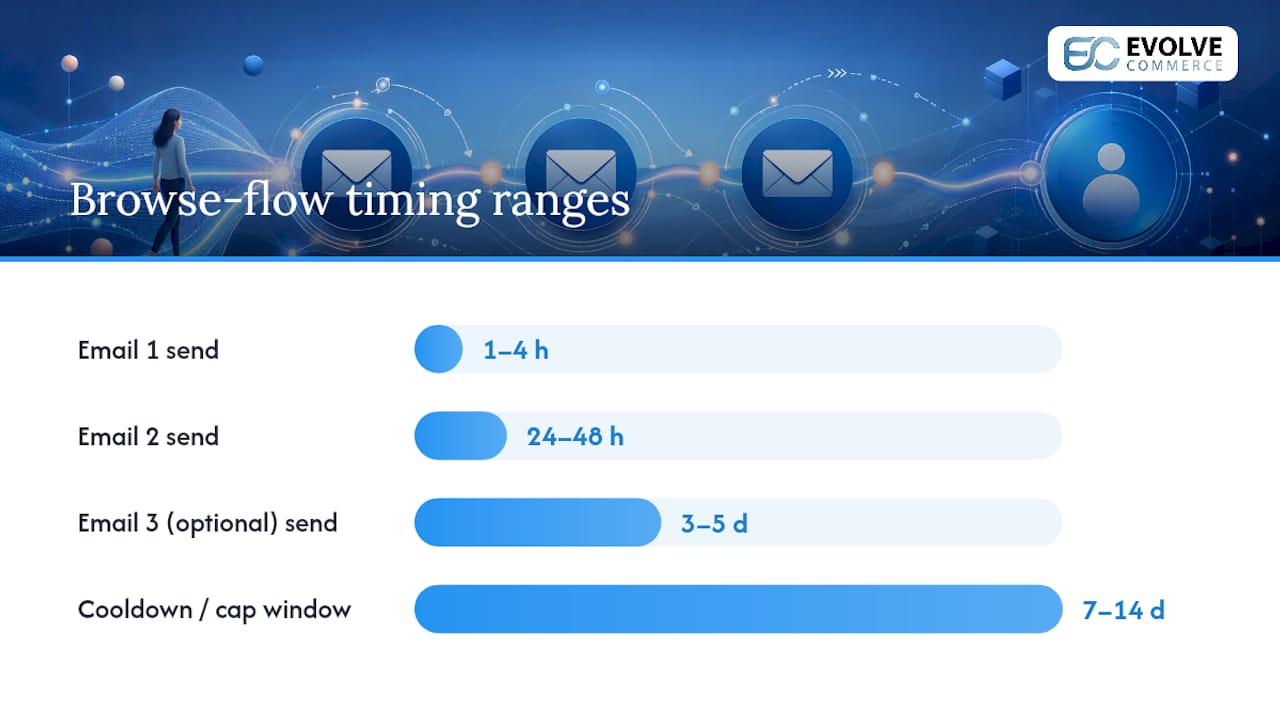
- Email 1, sent 1 to 4 hours after the view: show the exact product viewed, keep the tone light, no discount, no pressure. Best practice recommends waiting at least an hour rather than firing instantly, which avoids the “were you watching me?” reaction.
- Email 2, sent 24 to 48 hours later: reintroduce the product alongside social proof, reviews, ratings, or a short line about why customers rate it highly.
- Email 3 (optional), sent 3 to 5 days later: this is the only point in the sequence where a small incentive belongs, and only for higher-intent segments such as repeat viewers.
Introduce a discount only in that final, optional message, and keep it modest, free shipping or a small percentage off works better than a steep cut, which trains shoppers to wait for one every time. Discounting in email one teaches your best browsers that patience pays, which erodes margin across your entire list over time.
Protect deliverability by capping how often any one subscriber can enter a browse flow. If someone views ten products in a week, they should not receive ten separate sequences. Most ESPs let you set a frequency cap or a “cool down” window, typically 7 to 14 days, between browse abandonment sends to the same recipient. Smart-sending windows that avoid firing in the middle of the night in the recipient’s time zone also protect open rates, since a 3am send rarely gets opened before it goes stale in the inbox.
What should a browse abandonment email actually contain?
The best browse abandonment emails are built from a small set of components, each doing a specific job. Get the hero block wrong and nothing else in the email matters, because that is what the reader’s eye lands on first.
The hero product block needs a clear image, the product title, the price, and a direct link back to the product page. This is the single most important element in the entire email: it reminds the visitor exactly what they were looking at, without making them think or scroll. Skip the clever copy here. Show the product plainly.
A related recommendations block typically shows three to six items, similar products, complementary items, or bestsellers if the viewed product is out of stock. Always build a fallback for this block: if your recommendation engine has nothing relevant to show, default to top sellers in the same category rather than leaving a blank space.
Social proof works best placed just below the hero block or inside email two of the sequence. A line like “Rated 4.8 out of 5 by over 2,000 customers” or a short customer quote does more to move a hesitant browser than another product shot.
CTA choice should shift across the sequence. Email one should carry a soft CTA, phrasing like “Take another look” or “Still thinking it over?” rather than “Buy now”. Email two can firm up slightly with “Shop the [Product Name]” or “See what customers say”. Only the final, optional email should use a direct, sales-oriented CTA, since by that point you have earned the right to ask more plainly.
Subject lines and preheaders should be built for the segment and the position in the sequence, not written generically:
| Sequence position | Subject line template | Preheader template |
|---|---|---|
| Email 1 (soft) | “Still thinking about the [Product Name]?” | “It’s still available, just in case.” |
| Email 2 (proof) | “[Product Name] is a customer favourite” | “See why shoppers keep coming back to it.” |
| Email 3 (incentive) | “A little something for the [Product Name]” | “Free shipping if you grab it today.” |
Curated galleries like Really Good Emails’ browse abandonment collection are worth an hour of your time for layout inspiration, and testing shows subject lines that name the specific product outperform generic reminders, so lead with product-name personalisation before you test anything cleverer.
Two annotated patterns worth copying: a homeware brand sending a single hero image with a one-line review quote underneath converts well because it respects the reader’s time. A fashion brand stacking three outfit combinations built around the viewed item performs well for browsers who came in without a firm decision yet. What to avoid in both cases is stacking more than one CTA above the fold, forcing the reader to choose between “shop now”, “see reviews”, and “view similar”, which reliably suppresses clicks rather than raising them.
How do you set up a browse abandonment flow in your ESP?
Building this properly means getting the technical layer right before you touch a single word of copy. A flow that fires on bad data or fails to check consent will underperform no matter how good the template looks.
- Build the ESP trigger. In Klaviyo browse abandonment flows and equivalent tools, set the trigger condition to “viewed product” AND “not added to cart” within your chosen lookback window, typically 4 to 24 hours.
- Configure dynamic product blocks. Pull the viewed product’s image, title and price dynamically rather than hardcoding them, and set a fallback block, top sellers or category bestsellers, for cases where the product feed returns nothing.
- Add suppression logic. Exclude anyone who has purchased in the last 24 to 48 hours and anyone currently inside a cart abandonment flow; cart flows should always take precedence over browse.
- Verify the consent basis at send time, not at signup, and log that check inside your data layer alongside the trigger event so you have a record if a regulator or platform ever asks.
- Test before launch. Preview the email across desktop and mobile clients, run a small holdout group that receives no browse emails at all, and reproduce the trigger manually by viewing a test product yourself to confirm the flow fires correctly end to end.
What KPIs and benchmarks should you track?
Four metrics tell you whether a browse abandonment flow is actually working: open rate, click-to-conversion rate, revenue per recipient (RPR), and unsubscribe rate. Open rate tells you whether your subject lines and sender reputation are healthy. Click-to-conversion tells you whether the email content itself is doing its job once opened. RPR is the number that matters most to finance, since it accounts for both how many people convert and how much they spend. Unsubscribe rate is your early warning system for a flow that has started to feel intrusive.
| Metric | Typical benchmark range | What it tells you |
|---|---|---|
| Open rate | 34% to 45% | Subject line and sender health |
| Conversion rate | 1% to 3% | Content and offer relevance |
| Revenue per recipient | Varies by AOV and segment | Overall flow profitability |
| Unsubscribe rate | Should stay low relative to campaigns | Frequency and intent-threshold health |
These browse abandonment benchmarks sit well above generic newsletter performance, but treat them as a guide, not a guarantee. Your own numbers depend heavily on traffic quality, product price point, and how tight your intent threshold is.
Prioritise A/B tests in this order: subject line personalisation first, since it is cheap to test and moves open rate quickly; hero image treatment second, lifestyle shot versus plain product shot; incentive timing third, testing whether the discount belongs in email three or should be dropped entirely; and intent threshold last, since it takes longer to gather enough data to trust the result. Report on the flow monthly, and always measure against a holdout group rather than judging performance in isolation, since a flow can look successful in absolute terms while adding little net lift over doing nothing at all.
Why do browse abandonment flows underperform, and how do you fix it?
Most underperforming browse flows share one of five faults, and each has a fast fix.
- Over-triggering on any view: if the flow fires on a single five-second glance, raise the intent threshold and test the change against a holdout.
- Using cart-abandonment urgency: language like “hurry, only 3 left” belongs to cart recovery, not browse. Soften the copy and withhold discounts until the final email.
- Skipping consent checks: sending without a valid basis under GDPR risks complaints and deliverability damage. Enforce the check at send time, every time.
- Overlapping flows: a shopper in both a browse and a cart flow simultaneously gets confusing, contradictory messages. Always give the more recent, higher-intent trigger priority.
- Ignoring what the data is telling you: a product with a high view-to-no-cart ratio across many visitors is usually a product-page problem, price, images, or copy, not an email problem. Feed that signal to your UX or CRO team instead of just emailing harder.
How Evolve Commerce builds browse flows into a full-funnel system
Evolve Commerce treats a viewed-product event as more than a trigger for one email. Inside the AdWize analytics dashboard, browse signals feed server-side attribution and get flagged back to creative and paid media teams, not just the lifecycle email queue, so a product with a poor view-to-cart ratio gets surfaced as a CRO issue, not just an email opportunity.
That governance model, clear thresholds, monthly reporting, and a direct line to UX when the data flags a problem, is how a browse flow stays useful rather than becoming background noise. Clients including Illuminated Mirrors, ONYX, and FILA have used this integrated approach across paid, creative, and lifecycle channels; full detail on outcomes sits in the case studies.
The ‘gracious host’ standard for browse-abandonment emails
Ask one question before you send a browse email: would a good host say this to a guest browsing their shop? A gracious host offers help, not pressure, and never leads with a discount before the guest has even asked a question.
Helpfulness compounds. A shopper who feels respected during browsing trusts you more at checkout, and that trust shows up in lifetime value long after the first sale. Teams building these triggers should optimise for that longer relationship, not the next 48 hours of revenue.
— Evolve Commerce
How Evolve Commerce can help you recover lost browse traffic
Evolve Commerce is the alternative to piecing together browse recovery yourself across a dozen disconnected tools. Every account plugs into AdWize, so the same data layer that flags a stalled browse session also feeds your paid media, creative, and reporting in one connected system, rather than an email trigger sitting in isolation from the rest of your marketing.
Evolve Commerce’s email and SMS marketing service builds the intent thresholds, dynamic templates, and suppression logic covered in this article, then wires them into consent checks and reporting from day one. An analytics platform is available on several plans with varying depths of analytics and attribution to support lifecycle programmes. Typical early wins include a properly filtered browse trigger, a three-email template set ready for your product catalogue, and a first reporting cycle showing net lift against a holdout group.
If you want a clearer picture of where browse abandonment fits inside your wider funnel, book a 360° marketing audit with Evolve Commerce and get a specific recommendation for your store’s traffic and product mix.
Sources
- 10+ browse abandonment email examples that convert (2026)
- Browse abandonment recovery · martech cookbook
- Browse Abandonment Email Guide | ConversionStudio
- The Best Browse Abandonment Email Examples & Designs
FAQ
Can you give examples of browse abandonment emails?
A typical example shows the exact product a visitor viewed, its price and image, alongside three to six related recommendations and a soft call to action like “Still thinking it over?”. Galleries such as Really Good Emails collect real examples across fashion, homeware, and electronics brands for layout inspiration.
What is checkout abandonment?
Checkout abandonment happens when a shopper starts the checkout process, entering shipping or payment details, but leaves before completing the order. It sits later in the funnel than both browse and cart abandonment, since the shopper has already committed to buying and simply failed to finish.
How do I stop getting abandoned cart emails?
You can unsubscribe using the link at the bottom of any cart abandonment email, or adjust your email preferences directly with the retailer if that option is offered. Under UK GDPR rules, a retailer must honour an unsubscribe request and stop sending behavioural emails once you opt out.
How long should you wait before sending an abandoned cart email?
Cart abandonment emails typically send faster than browse abandonment ones, often within 1 to 4 hours of the abandoned checkout, since basket intent is stronger and more time-sensitive. Browse abandonment emails follow a slightly slower 1 to 4 hour first send, with a follow-up at 24 to 48 hours, reflecting the softer intent behind a page view.