
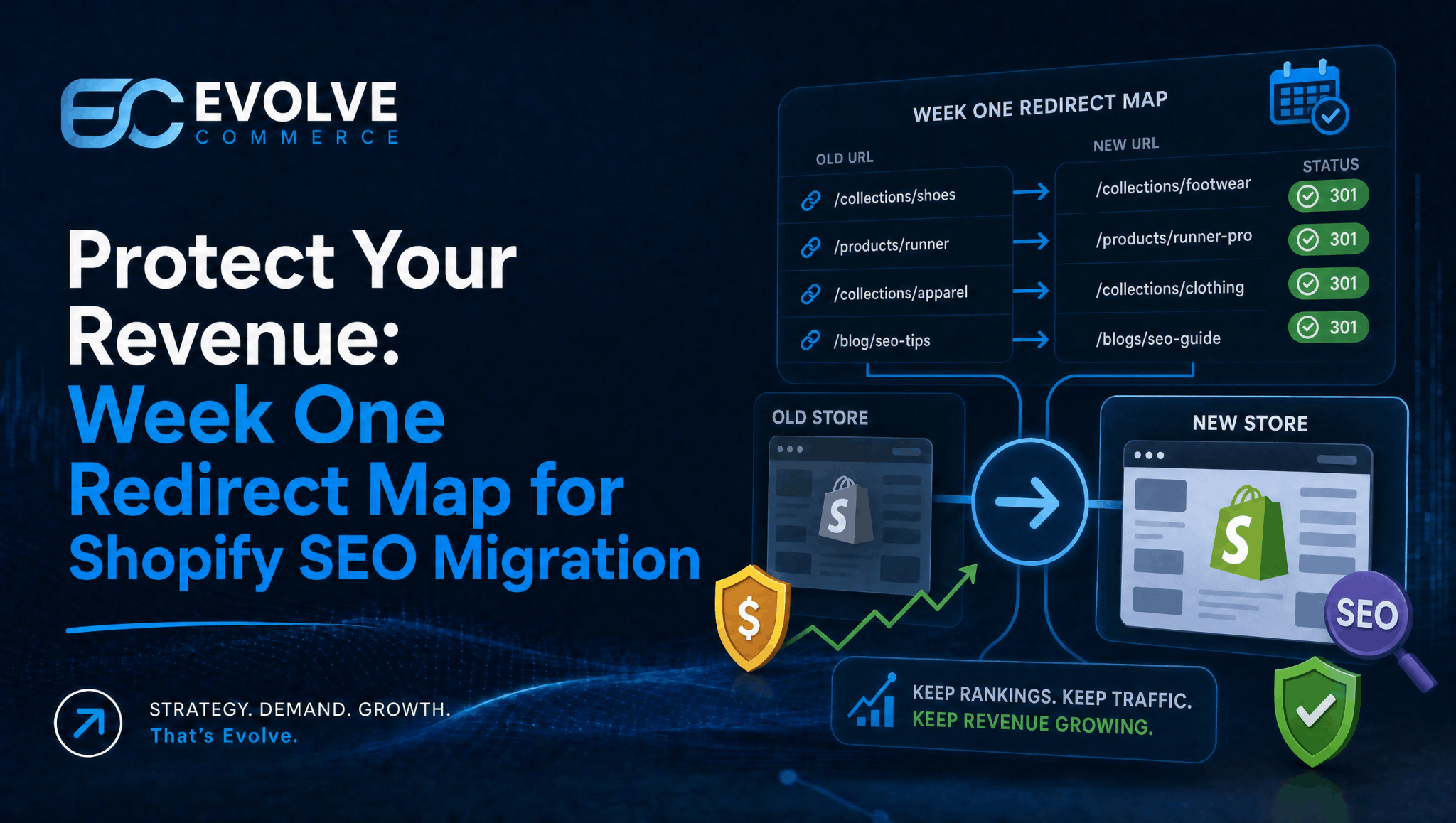
Build a one-to-one 301 redirect map and preserve your ranking pages’ metadata before your domain switches over, not after. Get this wrong and expect measurable traffic loss within days. Get it right and most stores stabilise within weeks; larger catalogues can take months to fully recover. Keep Search Console and a professional migration partner on hand throughout, because daily monitoring in the first fortnight is what catches problems while they’re still cheap to fix.
- Building a comprehensive redirect map in the first week ensures smoother ranking preservation and reduces traffic loss during migration.
- Prioritizing high-traffic pages with over 1,000 monthly impressions for exact redirects is critical to safeguarding revenue.
- Manually reviewing and testing all high-impression redirects before launch minimizes errors that automated tools might miss.
- Preserving metadata, structured data, and internal links on Tier 1 and Tier 2 pages is essential for maintaining search visibility after migration.
- Recovery of rankings can take weeks to months, depending on site size, with smaller stores stabilizing faster and ongoing monitoring being key.
Table of Contents
- Shopify SEO migration checklist: preparation to post-launch
- Common Shopify migration pitfalls that cost you rankings
- How do you audit and prioritise pages before migrating?
- Building and testing your Shopify redirect map
- What metadata and structured data must you preserve?
- What should you test on staging before launch?
- Launch day: what to check first
- How long does it take to recover rankings after migration?
- Evolve Commerce’s approach to a managed migration
- Why user-generated content and reviews need their own migration plan
- Handling multilingual and multi-regional SEO during migration
- Managing canonical tags and hreflang in Shopify
- Auditing and updating backlinks after migration
- How Shopify’s URL structure affects your existing rankings
- The redirect map is the project, not a task within it
- Get help migrating to Shopify without losing rankings
- Resources to check at each stage of your migration
- Sources
- FAQ
Shopify SEO migration checklist: preparation to post-launch
A Shopify SEO migration succeeds or fails on sequencing. Teams that treat redirects as a launch-day task consistently lose more traffic than teams that treat redirect mapping as the first job on the project plan. The build order matters as much as the individual tasks.
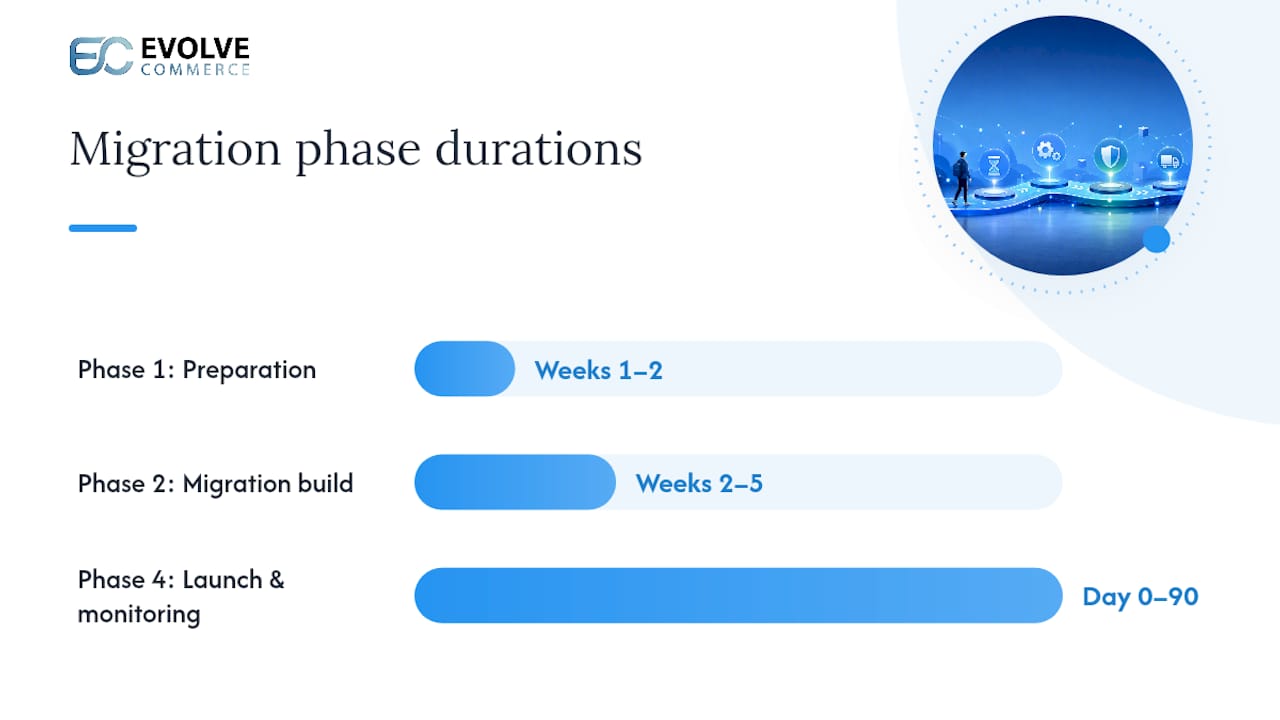
Here’s the phase structure that keeps a migration on track, with ownership assigned so nothing falls between the SEO lead, the developer, and whoever manages analytics.
Phase 1: Preparation (weeks 1 to 2)
- Export every indexed URL from Search Console and combine it with a full site crawl (SEO lead)
- Build the one-to-one redirect map immediately. This cannot wait until the theme is ready (SEO lead, with developer sign-off)
- Record current rankings, organic traffic, and conversion rates as your baseline (analytics)
- Tier every URL by impression volume to prioritise the work that follows (SEO lead)
Phase 2: Migration build (weeks 2 to 5)
- Port metadata (titles, meta descriptions, H1s) for every Tier 1 and Tier 2 page (SEO lead, developer)
- Rebuild structured data: Product, Collection, BreadcrumbList and FAQ schema (developer)
- Update internal links to point at final Shopify URLs, not the old structure (developer)
- Configure canonical tags and, where relevant, hreflang attributes (developer)
Phase 3: Staging and pre-launch QA (week 5 onwards)
- Confirm staging carries a noindex tag and won’t leak into Google’s index (developer)
- Run Lighthouse and compare against current production Core Web Vitals (developer)
- Crawl staging for hardcoded old URLs, broken links, and redirect chains (SEO lead)
- Test analytics and tag deployments against production data (analytics)
Phase 4: Launch and post-launch monitoring (day 0 to day 90)
- Verify redirects fire correctly and submit the new sitemap to Search Console (SEO lead)
- Watch Search Console daily for the first two weeks, then weekly to day 30 (SEO lead, analytics)
- Triage and fix any missed redirects or indexing errors immediately (developer)
The rule that separates smooth migrations from messy ones is simple: the redirect map gets built in week one, not week five when the developer finally has spare capacity. Everything else in this checklist depends on that map existing early enough to test properly.
Common Shopify migration pitfalls that cost you rankings
Most ranking losses during a platform switch trace back to a small set of repeatable mistakes. Knowing them in advance is cheaper than fixing them after launch.
- Missing redirects. Pages that existed on the old platform simply vanish, and Google returns a 404 to anyone who follows an old link or bookmark.
- Many-to-one redirects. Dozens of product pages all pointing to the homepage tells Google those pages no longer have distinct value, and their ranking signals don’t transfer.
- Metadata loss. Shopify will auto-generate titles and descriptions if you don’t supply your own, and the auto-generated versions rarely match what was ranking before.
- Schema gaps. Product, review, and FAQ markup that existed on the old site often doesn’t get rebuilt, weakening rich result eligibility.
- Internal link chains. Hardcoded links pointing at old URL patterns create redirect chains that slow crawling and dilute link equity, an issue flagged repeatedly as an overlooked cause of post-migration decline.
- Performance regressions. A new theme loaded with apps and heavy imagery can be genuinely slower than the store it replaced, and speed drops often show up as ranking drops within a month.
- Staging indexability errors. Forgetting to remove a noindex tag at launch, or forgetting to add one before staging goes live, both cause damage in opposite directions.
Pro Tip: Don’t trust automated redirect mapping tools blind. Manually review your top 200 redirected URLs by traffic, because the small percentage of errors these tools make tends to land on your highest revenue pages.
How do you audit and prioritise pages before migrating?
Start by building a single master list of every URL that currently earns organic visibility because you cannot protect what you haven’t counted. This means combining two data sources, not relying on one.
- Export Search Console’s indexed URLs. Pull the full list of valid, indexed pages along with impressions and clicks for the last three to six months.
- Run a full site crawl. Use a crawler to catch every live URL, including pages Search Console might under-report, orphan pages, or ones with thin internal linking.
- Merge the two lists. Search Console data catches pages a crawler alone would miss, particularly older pages with few internal links pointing to them.
- Tier every URL by impression volume. This single step does more to protect revenue than any other part of the audit.
The tiering standard most migration specialists now use splits pages into three bands. Tier 1 pages, those pulling in more than 1,000 monthly impressions, must be preserved one-to-one with no exceptions. Tier 2 pages, sitting between 100 and 1,000 impressions, should also be preserved wherever practical. Tier 3 pages, those with relatively low impressions, are the only tier where consolidation onto a broader page is generally acceptable.
| Tier | Monthly impressions | Preservation policy |
|---|---|---|
| Tier 1 | Over 1,000 | Redirect one-to-one, no exceptions |
| Tier 2 | 100 to 1,000 | Preserve individually wherever practical |
| Tier 3 | Under 100 | Consolidation onto a relevant page is acceptable |
For every Tier 1 and Tier 2 URL, capture a fixed set of fields before you touch anything: the existing title tag, meta description, H1, canonical target, schema types in use, count of internal links pointing to the page, and referring domains from your backlink tool. This data becomes your working document for the redirect map and metadata port covered next, so it needs to be accurate rather than approximate. A spreadsheet with one row per URL and these columns filled in is the single most useful artefact you’ll produce during the entire project.
Building and testing your Shopify redirect map
The redirect map is the control document for the whole migration, and it needs a consistent structure from the first entry. A working spreadsheet needs, at minimum: old URL, new URL, redirect type (301 in almost every case), tier, and a notes column for anything unusual, such as a product that’s been discontinued or a category that’s been merged.
- Map every Tier 1 and Tier 2 URL one-to-one. One-to-one redirects preserve ranking signals far more reliably than mapping several old URLs to a single new one.
- Choose a sensible fallback for genuinely removed pages. Redirect to the nearest semantic equivalent, such as the parent collection, rather than defaulting everything to the homepage.
- Import the map into Shopify. For smaller catalogues, Shopify’s native URL redirect CSV import handles this directly. For larger volumes, the Shopify Admin API or a service like Cloudflare Bulk Redirects can manage tens of thousands of rules more efficiently than the native tool.
- Test manually before launch, starting with Tier 1. Click through every high-impression redirect by hand. Automated scripts are useful for volume but won’t catch a redirect that technically works but lands on the wrong page.
- Scan for chains and dead ends. A redirect that points to another redirect, which points to a third, wastes crawl budget and can break entirely if one link in the chain is removed later. Run a crawler against your full redirect list to confirm every rule resolves in a single hop with no lingering 404s.
Pro Tip: Keep every redirect live for at least 12 months after launch, and ideally indefinitely. Removing redirects too early can strip away link equity that took years to build, even if the migration itself went smoothly.
What metadata and structured data must you preserve?
Every Tier 1 and Tier 2 page needs its on-page signals carried across deliberately, not left to chance. The fields that matter most are the title tag, meta description, H1, main body copy, image alt text, and canonical tag. None of these transfer automatically when you move platforms.
- Copy title tags and meta descriptions across manually rather than letting Shopify generate its own, because Shopify’s auto-generated versions rarely match the phrasing that was already earning clicks in search results.
- Rebuild structured data for Product, Collection, BreadcrumbList, and FAQ types, then validate each template with Google’s Rich Results Test before launch.
- Check new theme templates for content hidden behind tabs or accordions. Google can still index this content, but comprehensive, visible collection copy tends to perform better for both traditional search and AI-driven discovery.
- Preserve alt text on product images, particularly where it’s driving image search traffic on higher volume products.
Pro Tip: Run a side-by-side comparison of ten Tier 1 pages on old versus new platform, checking title, meta description, H1, and word count. Discrepancies here are almost always accidental, but they’re expensive to leave uncorrected.
What should you test on staging before launch?
Staging is where you catch problems while they’re still free to fix. Treat it as a full dress rehearsal, not a quick glance at whether the new theme loads.
- Confirm indexability settings are correct in both directions. Staging must carry a noindex tag so it never leaks into Google’s index, and you need a clear plan to remove that tag the moment production goes live.
- Run Lighthouse against the new theme and compare it to current production field data. The goal is to match or beat existing Largest Contentful Paint, Cumulative Layout Shift, and Interaction to Next Paint scores, not simply avoid making things dramatically worse.
- Crawl staging specifically for hardcoded old URLs. Developers often copy across internal links from the old site structure without updating them, which creates unnecessary redirect hops the moment you launch.
- Test canonical tag and hreflang output across templates. A canonical tag pointing at the wrong URL, or a hreflang block missing a region, is far easier to fix on staging than after Google has crawled it live.
- Fire your analytics and Google Tag Manager containers against staging using production-like data. Confirm events, conversions, and enhanced ecommerce tracking all fire correctly before the first real customer visits the new site.
Speed deserves particular attention here. Speed regressions on a new theme commonly cause ranking drops within 30 days of launch, and by the time you notice the drop in Search Console, you’ve already lost the traffic. Set a speed budget for the new theme before development starts, not after.
Launch day: what to check first
Launch day is short on time and high on risk, so work through fixed priorities rather than reacting to whatever looks most urgent in the moment.
- Confirm redirects are live in production, then manually click through every Tier 1 redirect again. Staging tests don’t always survive the final deployment.
- Verify analytics and Google Tag Manager are firing correctly on a sample of page types, product, collection, and blog, then add a launch annotation in your analytics platform so any traffic dip is clearly attributable to the date of the switch.
- Submit your new sitemap to Search Console immediately and request indexing for your highest-value Tier 1 URLs individually, rather than waiting for Google to discover them on its own schedule.
- Open Search Console’s Coverage and Performance reports daily for the first 14 days. Watch specifically for a spike in 404 errors, which almost always points to a redirect that was missed or built incorrectly.
If you find a missed redirect during this window, fix it immediately, request indexing for the correct URL, and keep watching. Speed of correction correlates strongly with how much traffic you actually lose, so a redirect fixed within hours rarely shows up in your traffic numbers at all, while the same error left for a week can take a month to recover from.
How long does it take to recover rankings after migration?
Recovery timing depends heavily on site size, but the pattern is consistent: small sites typically stabilise within weeks, while larger catalogues can take months. Core Web Vitals field data alone can take around 28 days to settle on a new theme, so don’t judge speed performance from the first week of numbers.
Run your monitoring on three cadences. Check Search Console daily for the first 14 days, since this is when missed redirects and indexing errors surface fastest. Switch to weekly checks from day 15 to day 30, once the initial fires are out. Then move to monthly reviews from day 31 through day 90, tracking whether rankings and traffic are genuinely trending back towards baseline rather than plateauing below it.
Watch five metrics through this whole window:
- Impressions and clicks by page, compared against your pre-migration baseline
- Valid indexed URL count in Search Console, which should stabilise near your pre-migration total
- 404 error volume, which should trend towards zero within the first month
- Core Web Vitals scores, tracked against the field data benchmark you captured before launch
- Ranking position for your top 20 to 50 revenue-driving keywords
When something does go wrong, triage in a fixed order. Missed redirects first, because they’re the highest-impact, fastest-to-fix problem. Metadata gaps second, since a wrong title or missing meta description quietly suppresses click-through rate even on pages that are indexed correctly. Speed regressions third, because these take longer to diagnose and fix. Indexing hiccups last, since Google’s crawl and re-index cycle often resolves these on its own once the underlying page is correct.
Evolve Commerce’s approach to a managed migration
A migration handled properly reads like an engineering project with SEO as the specification, not a marketing task bolted onto a development sprint. That’s how Evolve Commerce approaches Shopify migrations: redirect mapping owned from week one, themes held to a speed budget before a single line of code ships, and Search Console checked daily rather than glanced at occasionally.
The scenarios where this matters most are predictable. A catalogue running into the thousands of SKUs, a store operating across multiple regions or languages, or a site carrying years of accumulated backlinks all raise the cost of getting the redirect map wrong. In those cases, the revenue at risk during a botched migration usually exceeds the cost of hiring a specialist to run it properly, which is worth weighing seriously before assigning the project to whoever has spare capacity that quarter.
Why user-generated content and reviews need their own migration plan
Product reviews and customer questions carry ranking value that’s easy to lose in a platform switch, because review data often lives in a third-party app tied specifically to your old platform’s database structure. Before migrating, export every review with its original date, star rating, and reviewer name intact, since review recency and volume both feed into how Google displays rich results for product pages.
Check whether your review app has a native Shopify equivalent, and if not, confirm your chosen Shopify review app can import historical data rather than starting every product from zero reviews. A product page that drops from 340 reviews to zero overnight loses both the trust signal for shoppers and the schema markup that was likely earning star ratings in search results.
The same logic applies to user-generated Q&A sections and customer photos, where they exist. If these can’t be migrated directly, consider archiving them on a legacy subdomain with a canonical tag pointing back to the new product page, rather than deleting the content outright. Losing this content silently is one of the more avoidable ranking hits in a migration, precisely because it’s rarely on anyone’s checklist until reviews vanish and someone asks why.
Handling multilingual and multi-regional SEO during migration
If your store serves more than one language or region, the migration plan needs a parallel workstream for each locale, not a single redirect map covering only your primary market. Every localised URL needs its own entry in the redirect map, tested independently, because a redirect that works for your English site won’t necessarily fire correctly for a German or French subdirectory.
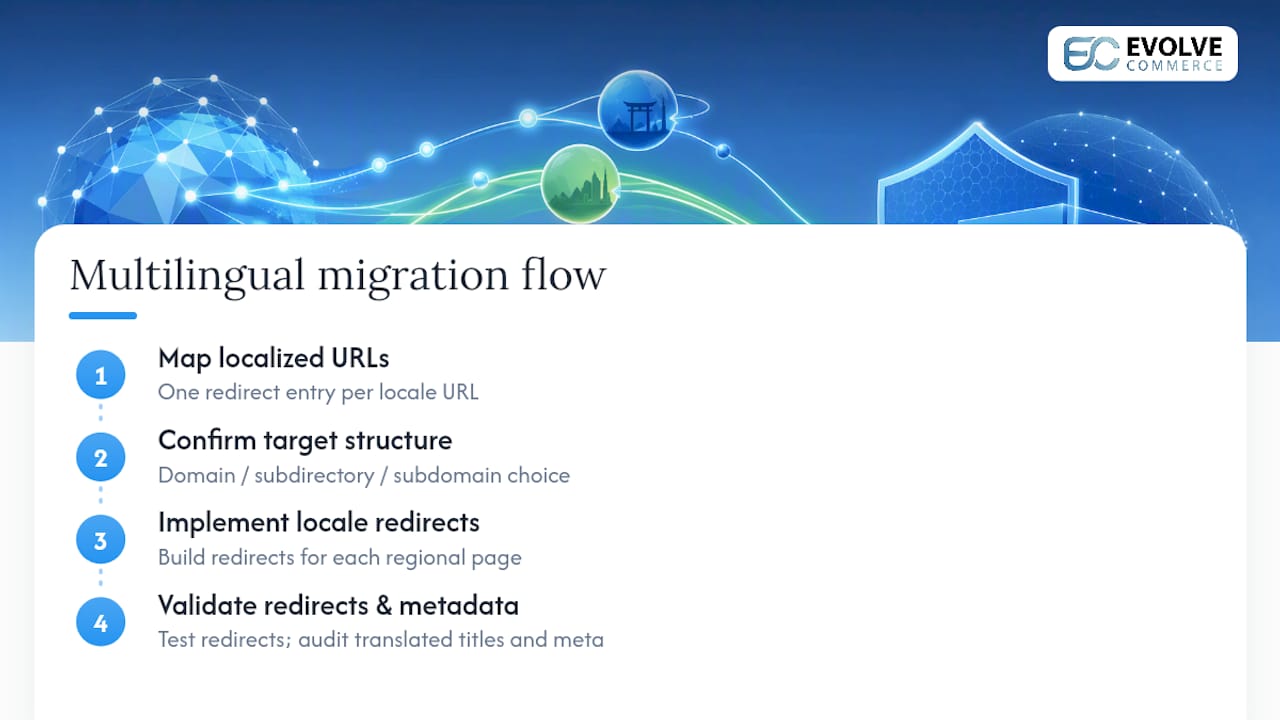
Shopify Markets handles regional domains, subdirectories, or subdomains differently depending on your setup, so confirm which structure you’re moving to before building redirects, not after. A change from country-code domains to subdirectories, for instance, is a bigger structural shift than it first appears and needs every regional page mapped explicitly.
Audit each locale’s metadata and content separately too. Translated title tags and meta descriptions sometimes get missed entirely during a rushed migration, leaving international pages showing English fallback text or Shopify’s auto-generated version in the wrong language. This is one of the fastest ways to lose international traffic without anyone noticing until the next quarterly review.
Managing canonical tags and hreflang in Shopify
Canonical tags and hreflang attributes both need explicit attention during a migration, because Shopify’s defaults won’t automatically match your pre-migration setup if you’re running multiple regional or language variants. Shopify generates canonical tags automatically for standard pages, but variant URLs, filtered collection pages, and paginated series can still create duplicate content risk if canonicals aren’t checked deliberately.
For hreflang, Shopify Markets can generate the tags for regional and language variants, but the output needs validating against your actual URL structure once the migration is complete, not assumed correct because the feature exists. Crawl your live site after launch and confirm every hreflang cluster points to the right regional equivalent, with a self-referencing tag included on each page in the set.
Get this wrong and the risk isn’t a dramatic ranking collapse. It’s quieter: Google serving the wrong regional page to searchers, or treating near-duplicate content across regions as genuinely duplicate, which dilutes ranking strength across every version of the page instead of just one.
Auditing and updating backlinks after migration
Your backlink profile doesn’t automatically follow you to the new URL structure, and this is one of the most commonly skipped steps in a migration plan. Pull a full backlink export before you launch, sorted by referring domain authority, and identify which of your highest-value links point at URLs that are changing.
Where a redirect is in place, most of that link’s value passes through automatically, so outreach isn’t urgent for every link. But for your top 20 to 30 referring domains, particularly ones linking to Tier 1 pages, reach out directly and ask the site owner to update the link to the new URL. Direct links carry slightly more weight than links passing through a redirect, and removing a redirect hop entirely also improves crawl efficiency for that page.
This audit is also the moment to catch broken backlinks that predate the migration entirely, links pointing at pages that were already gone before you touched the platform. Cleaning these up alongside your migration-specific outreach is efficient, since you’re already contacting webmasters about URL changes.
How Shopify’s URL structure affects your existing rankings
Shopify enforces certain URL patterns you can’t fully override, and this is worth planning for rather than discovering mid-migration. Product URLs follow a /products/ path and collection URLs follow /collections/, regardless of what structure your previous platform used. If your old site had flat URLs or a different taxonomy entirely, every single product and collection page is changing its URL, not just its domain.
This makes the redirect map larger and more detailed than many teams expect going in. It’s not simply old domain to new domain; it’s old path structure to Shopify’s enforced structure, applied individually across your full catalogue. Blog URLs typically move to a /blogs/ path too, which catches out stores that had content marketing living at the site root.
The mitigation is straightforward in principle, if labour intensive in practice: map every single URL individually rather than assuming a pattern-based bulk redirect rule will catch everything correctly. Pattern-based rules work well for straightforward one-to-one moves but frequently misfire on edge cases, like products that share a name, or collections that were restructured during the move rather than carried across unchanged.
The redirect map is the project, not a task within it
Most migration guides treat redirects as one line item among many, sitting somewhere in the middle of a longer checklist. That framing is backwards. The redirect map is the single artefact that determines whether the migration preserves revenue or bleeds it, and every other task, metadata porting, structured data, internal linking, exists to support what that map protects.
The conventional advice to “build a redirect strategy” undersells the urgency. A redirect map started in week four, after the theme is mostly built, is a map built under time pressure, reviewed less carefully, and tested against a shrinking launch window. The same map built in week one gets reviewed twice, tested properly against staging, and adjusted as the audit turns up orphan pages a crawl alone would have missed.
If you take one thing from this checklist, prioritise the audit and the redirect map before anything else gets built. Everything downstream, your metadata, your internal links, your monitoring plan, works better when it’s built against a redirect map that was rushed the least.
— Evolve Commerce
Get help migrating to Shopify without losing rankings
Shopify migrations are best managed as an engineering project with SEO built into every phase, not bolted on after the theme’s already live. That means redirect mapping owned from day one, metadata ported page by page rather than left to Shopify’s defaults, theme performance held to a speed budget before launch, and Search Console checked daily through the highest-risk window.

Consider hiring a specialist when your catalogue runs into the thousands of SKUs, when you’re managing multiple regions or languages, or when your backlink profile is large enough that a missed redirect on the wrong page could cost real revenue. Evolve Commerce’s SEO strategy work and Adwize analytics platform give a migration project the visibility to catch problems before they show up as lost traffic, and past client results are outlined in the case studies if you want to see what a managed migration has delivered for other retailers. Book a discovery call through Evolve Commerce to talk through your catalogue size, timeline, and what a managed migration would look like for your store.
Resources to check at each stage of your migration
Search Console is the tool you’ll return to most, both for the pre-migration export and for daily monitoring after launch. Shopify’s own SEO documentation explains what the platform handles automatically versus what needs manual work. A full-site crawler is essential for building your master URL list and for catching hardcoded links on staging.
For structured data validation, Google’s Rich Results Test confirms your schema markup before launch rather than after. If you’re planning ahead for AI-driven search alongside traditional rankings, this AI SEO strategy guide covers how structured, comprehensive content earns visibility across both.
Sources
- Shopify SEO Migration: How To Preserve Organic Traffic
- Shopify SEO AI readiness playbook
- Shopify Help Center | Improving search engine optimization (SEO)
FAQ
Is Shopify good for SEO?
Shopify handles core technical SEO well, generating sitemaps, canonical tags, and HTTPS automatically. But ranking success still depends on manual work: metadata, internal linking, and structured data all need attention from you, not the platform.
How much does it cost to migrate a website to Shopify?
Cost varies significantly based on catalogue size, the complexity of your redirect map, and whether you handle metadata and structured data porting in-house or bring in specialist help. Evolve Commerce assesses this per project during a discovery call, since a 200-product store and a large multi-region catalogue require very different levels of work.
Can you make £10,000 a month on Shopify?
Many established Shopify stores reach this level of monthly revenue, though it depends heavily on niche, marketing investment, and product margins rather than the platform itself. A well-executed migration that preserves your existing organic traffic and rankings protects the revenue base you already have, which matters as much as growth tactics for stores already generating meaningful income.
Which SEO tool is best for Shopify?
No single tool covers every migration need. Search Console remains essential for indexing and impression data, a dedicated crawler catches technical issues a manual review would miss, and a platform like Evolve Commerce’s Adwize adds attribution and performance monitoring on top of standard SEO tools.
How long until rankings recover after a Shopify migration?
Small sites typically stabilise within a few weeks, while larger, more complex catalogues can take several months. Recovery speed depends heavily on how completely your redirect map and metadata were preserved before launch, and how quickly any missed issues get fixed once identified.